
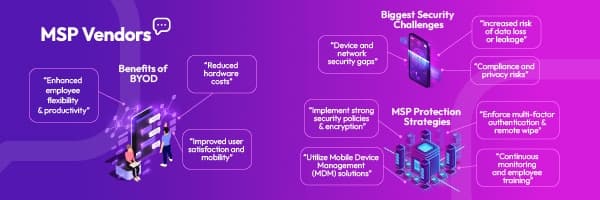
BYOD Security for MSPs: How to Protect Client Data Without Slowing Teams Down
As MSPs support more flexible work environments, BYOD is becoming the norm, but it’s not without risks. This guide explores the benefits of BYOD, the biggest security challenges, and practical steps MSPs can take to protect client data while still empowering user mobility.
It’s common now for employees to check work emails from their personal phones, access shared files from a home tablet, or hop on a client meeting from a laptop they bought themselves. This shift toward Bring Your Own Device (BYOD) is no longer just a convenience; it’s how many businesses operate day to day.
In fact, 82% of organizations now support BYOD in some form. Companies are leaning into it to save on hardware costs, support remote and hybrid teams, and give employees more flexibility.
But there’s a trade-off. Personal devices often sit outside the visibility and control of your clients’ IT teams. They may lack basic safeguards like encryption, regular patching, or strong authentication.
For managed service providers (MSPs), this makes every personal phone, tablet, or laptop a possible entry point for data leaks, malware, and compliance risks.
The challenge is balancing freedom with protection. In this blog, we’ll unpack what BYOD security really involves, what risks MSPs should prepare for, and the practical steps you can take to help clients embrace device flexibility, without compromising data integrity.
What is BYOD Security?
Bring Your Own Device (BYOD) security refers to the policies, tools, and practices that protect business data accessed on personal devices. These could be smartphones, laptops, or tablets that employees use for both work and personal tasks.
Unlike company-issued devices, personal ones aren’t always managed by IT. That makes them harder to monitor and secure, especially when used across different networks or with unvetted apps. For MSPs, BYOD security is about putting the right controls in place without disrupting the user experience, to reduce risks like data leakage, malware, or unauthorized access.
It’s not about locking everything down. It’s about setting clear boundaries, enabling safe access, and keeping client data protected, no matter where or how it’s being used.
Benefits of BYOD
When implemented with the right safeguards, BYOD can bring measurable value to both businesses and their employees. For MSPs, helping clients adopt BYOD securely isn’t just a risk conversation but also about supporting long-term efficiency and flexibility.
Enhanced Mobility and Flexibility
Employees can work from anywhere using devices they’re already comfortable with. Whether it’s checking a ticket from their phone or logging into a dashboard at home, BYOD supports real-time access without the usual hardware limitations.
Cost Savings
BYOD reduces the need for businesses to invest in company-owned laptops or mobile devices. Maintenance and replacement costs often drop too, since employees typically handle their own device upkeep.
Simplified IT Management
With fewer company-owned assets to track, clients may see a leaner device inventory. Paired with mobile management tools, MSPs can help streamline access control, compliance, and device security without increasing overhead.
Employee Satisfaction
Letting employees use their preferred devices can improve productivity and morale. Familiar interfaces often mean fewer helpdesk tickets and less time spent on training or troubleshooting.
BYOD Security Risks and Challenges
Despite its advantages, BYOD introduces serious security concerns, especially when devices operate outside IT’s control. For MSPs, understanding these risks is key to designing effective safeguards for client environments.
Malware Infections
Personal devices often lack enterprise-grade antivirus or endpoint protection. A single infected device can serve as a gateway for ransomware, spyware, or other threats that could compromise the client’s entire network.
Shadow IT
Employees may install unsanctioned apps or use third-party tools for convenience, creating blind spots in visibility and compliance. These unofficial systems can bypass security protocols and increase data exposure.
Data Leakage and Loss
Without proper controls, business data can end up stored in personal cloud apps, messaging platforms, or unsecured folders. If the device is lost, stolen, or compromised, sensitive data may be unrecoverable, or worse, leaked.
Mixing Personal and BusinessUse
Work files stored alongside personal photos, social media apps, or games can blur boundaries and create compliance issues. It also raises questions about data ownership and access rights when offboarding or investigating incidents.
Insecure Wi-Fi Usage
Public Wi-Fi remains a major weak point. Employees working from cafes, airports, or home networks may expose corporate data to eavesdropping, especially if traffic isn’t properly encrypted.
Compliance Challenges
Many industries have strict requirements around data handling, access control, and audit trails. BYOD can make it difficult to meet HIPAA, GDPR, or other regulatory standards unless protections are clearly defined and consistently enforced.
Best Practices to Secure BYOD For Your MSP’s Clients
Securing BYOD environments doesn’t mean locking down every phone or tablet. Instead, it’s about building smart, scalable safeguards that strike the right balance between user freedom and business security. MSPs play a critical role here, both as technical enablers and strategic advisors.
Set Clear Ground Rules (Your BYOD Policy)
A strong BYOD policy lays the foundation. It should define what devices are allowed, what apps can be used, how data should be accessed, and what actions are off-limits. MSPs can help clients develop enforceable policies that address device enrollment, support limitations, and security obligations for users. This also protects businesses legally if a breach or incident occurs.
Advocate for Strong Passwords and Multi-Factor Authentication
Most personal devices are only as secure as their lock screen. Encourage clients to enforce complex passwords, biometric logins, and multi-factor authentication (MFA) for all work-related apps and accounts. Even if a device is lost or stolen, MFA adds a critical layer of protection against unauthorized access.
Lock Up Your Data (Device Encryption)
MSPs should ensure that sensitive data on BYOD endpoints is encrypted, both at rest and in transit. Modern mobile operating systems typically support built-in encryption, but it must be enabled and monitored. This makes stolen or misplaced devices far less of a risk.
Implement MDM or MAM Solutions
Mobile Device Management (MDM) and Mobile Application Management (MAM) platforms allow MSPs to set usage restrictions, wipe corporate data remotely, and enforce security policies on personal devices without being invasive. MAM, in particular, allows control over specific apps (like email or document access) without touching a user’s personal data, offering a more privacy-friendly option.
Secure Network Access Control
MSPs should help clients establish clear access controls at the network level. This includes segmenting guest networks, restricting access based on device posture, and using VPNs or secure gateways for off-site connections. Conditional access policies tied to identity and device health can help prevent risky connections before they reach critical systems.
Regularly Update Software and Patch Vulnerabilities
Outdated operating systems and apps are among the most common vectors for cyberattacks. MSPs should advise clients to require automatic updates on all BYOD endpoints and ensure users can’t bypass critical patches. Where possible, tools like endpoint detection and response (EDR) can flag devices running outdated software.
Educate Clients About Security Awareness
Technology alone won’t solve BYOD security. MSPs should provide ongoing security awareness training focused on mobile threats, phishing via text or messaging apps, safe app downloads, public Wi-Fi usage, and recognizing suspicious activity. Even a short, quarterly update can significantly reduce risky behavior.
Implement Data Loss Prevention (DLP) Strategies
DLP tools help detect and prevent sensitive information from being shared or stored in unauthorized ways. For BYOD, this could mean restricting downloads from cloud services, disabling copy-paste for sensitive fields, or preventing access from jailbroken or rooted devices. These solutions help MSPs enforce policy without disrupting workflows.
By putting these practices in place, MSPs can offer clients the freedom of BYOD without leaving data exposed. It’s about giving users the tools they need to work efficiently, while maintaining the control businesses need to stay secure and compliant.
Turn BYOD Risk into a Competitive Advantage
Bring Your Own Device is here to stay, and MSPs that manage it well stand out. Securing personal devices isn’t just about reducing risks. It’s a chance to show clients you’re ready for the future of work.
Make sure your stack includes mobile security, access control, and user training that fit today’s hybrid environments.
Ready to strengthen your BYOD offering? Discover trusted vendor tools for MSPs →